
Friday, January 14, 2011

Scrolling Title in Browser title bar for blogspot

0 comments


One of the most common uses of JavaScript is to create a scrolling message in the browser's status line. You can create a scrolling message using the string methods you have learned in this hour.
To begin, you'll need to define the message to be scrolled. You will use a variable called msg to store the message. To begin the script, initialize the variable (feel free to choose your own text for the message):


Steps to follow:

STEP #1
Log in to Blogger -> Layout -> Edit HTML and select the tick-box Expand Widget Templates
Then, find (CTRL+F) this code in the template

<head>

And immediately before it, paste this code:

<script type='text/javascript'>
//<![CDATA[
msg = "
==>http://blogwidgetbox.blogspot.com/<==";
msg = " .................................. " + msg;pos = 0;
function scrollMSG() {
document.title = msg.substring(pos, msg.length) + msg.substring(0, pos); pos++;
if (pos > msg.length) pos = 0
window.setTimeout("scrollMSG()",200);
}
scrollMSG();
//]]>
</script>

Thursday, January 13, 2011

Add Falling colored stars / Snowflakes /stars /butterfly / heart / Flowers / Leaves to Your Blog

0 comments
Perhaps by Christmas cheer to your blog once covered (colored) stars?

You Might Want to decorate your Christmas blog with falling stars?

yeah this tutorial will show you how to Add Falling colored stars / Snowflakes /stars /butterfly / heart / Flowers / Leaves to Your Blog.Its much simple than any other trick found on the net because you just have to add a simple single code to your blogspot post.Adding a colored stars / Snowflakes /stars /butterfly / heart / Flowers / Leaves posts widget is very easy...


Simply log in to Blogger -> go to Layout ->, click on "Add a Gadget", and select it as "HTML/JavaScript" type.

And finally paste this code in to it:


Falling Colored Stars: Falling SnowFlakes


<script type="text/javascript" src="https://sites.google.com/site/bdlab12/bdlab-blogspot-com/ColoredStars.txt" />
</script>


Falling fire Stars: Falling SnowFlakes


<script type="text/javascript" src="https://sites.google.com/site/bdlab12/bdlab-blogspot-com/fireStars.txt" />
</script>


Falling  Stars: Falling SnowFlakes


<script type="text/javascript" src="https://sites.google.com/site/bdlab12/bdlab-blogspot-com/Stars.txt" />
</script>


Falling snow: Falling SnowFlakes


<script type="text/javascript" src="https://sites.google.com/site/bdlab12/bdlab-blogspot-com/snow.txt" />
</script>


Falling Snow flakes1: Falling SnowFlakes


<script type="text/javascript" src="https://sites.google.com/site/bdlab12/bdlab-blogspot-com/Snowflakes1.txt" />
</script>


Falling Snow flakes2: Falling SnowFlakes


<script type="text/javascript" src="https://sites.google.com/site/bdlab12/bdlab-blogspot-com/Snowflakes2.txt" />
</script>


Falling Snow flakes3: Falling SnowFlakes


<script type="text/javascript" src="https://sites.google.com/site/bdlab12/bdlab-blogspot-com/Snowflakes3.txt" />
</script>



Falling Snow flakes4: Falling SnowFlakes


<script type="text/javascript" src="https://sites.google.com/site/bdlab12/bdlab-blogspot-com/Snowflakes4.txt" />
</script>


Falling Snow flakes5: Falling SnowFlakes


<script type="text/javascript" src="https://sites.google.com/site/bdlab12/bdlab-blogspot-com/Snowflakes5.txt" />
</script>


Falling Snow flakes6: Falling SnowFlakes


<script type="text/javascript" src="https://sites.google.com/site/bdlab12/bdlab-blogspot-com/Snowflakes6.txt" />
</script>


Falling Leaves: Falling SnowFlakes


<script type="text/javascript" src="https://sites.google.com/site/bdlab12/bdlab-blogspot-com/FallingLeaves.txt" />
</script>


Falling Green Leaf: Falling SnowFlakes


<script type="text/javascript" src="https://sites.google.com/site/bdlab12/bdlab-blogspot-com/GreenLeaf.txt" />
</script>


Falling Yellow Leaf: Falling SnowFlakes


<script type="text/javascript" src="https://sites.google.com/site/bdlab12/bdlab-blogspot-com/YellowLeaf.txt" />
</script>


Falling Greenish: Falling SnowFlakes


<script type="text/javascript" src="https://sites.google.com/site/bdlab12/bdlab-blogspot-com/Greenish.txt" />
</script>


Falling Tree Leaf: Falling SnowFlakes


<script type="text/javascript" src="https://sites.google.com/site/bdlab12/bdlab-blogspot-com/TreeLeaf.txt" />
</script>


Falling Heart1: Falling SnowFlakes


<script type="text/javascript" src="https://sites.google.com/site/bdlab12/bdlab-blogspot-com/Heart1.txt" />
</script>


Falling Heart2: Falling SnowFlakes


<script type="text/javascript" src="https://sites.google.com/site/bdlab12/bdlab-blogspot-com/Heart2.txt" />
</script>


Falling Heart3: Falling SnowFlakes


<script type="text/javascript" src="https://sites.google.com/site/bdlab12/bdlab-blogspot-com/Heart3.txt" />
</script>


Falling Blue Heart: Falling SnowFlakes


<script type="text/javascript" src="https://sites.google.com/site/bdlab12/bdlab-blogspot-com/BlueHeart.txt" />
</script>


Falling Red Heart: Falling SnowFlakes


<script type="text/javascript" src="https://sites.google.com/site/bdlab12/bdlab-blogspot-com/RedHeart.txt" />
</script>


Falling Heart4: Falling SnowFlakes


<script type="text/javascript" src="https://sites.google.com/site/bdlab12/bdlab-blogspot-com/Heart4.txt" />
</script>


Falling Flower: Falling SnowFlakes


<script type="text/javascript" src="https://sites.google.com/site/bdlab12/bdlab-blogspot-com/Flower.txt" />
</script>


Falling Love Heart: Falling SnowFlakes


<script type="text/javascript" src="https://sites.google.com/site/bdlab12/bdlab-blogspot-com/LoveHeart.txt" />
</script>


Falling butterfly Orange: Falling SnowFlakes


<script type="text/javascript" src="https://sites.google.com/site/bdlab12/bdlab-blogspot-com/butterflyOrange.txt" />
</script>


Falling butterfly Pink: Falling SnowFlakes


<script type="text/javascript" src="https://sites.google.com/site/bdlab12/bdlab-blogspot-com/butterflyPink.txt" />
</script>


Falling butterfly Blue: Falling SnowFlakes


<script type="text/javascript" src="https://sites.google.com/site/bdlab12/bdlab-blogspot-com/butterflyBlue.txt" />
</script>


Falling butterfly Green: Falling SnowFlakes


<script type="text/javascript" src="https://sites.google.com/site/bdlab12/bdlab-blogspot-com/butterflyGreen.txt" />
</script>


Note:  We are going to add more Falling colored stars / Snowflakes /stars /butterfly / heart / Flowers / Leaves, so keep visiting this page.


update Faling snow >>>>>>>

<script type="text/javascript" src="https://sites.google.com/site/bdlab12/bdlab-blogspot-com/snowstorm.txt" />
</script>


Falling butterfly 1: Falling SnowFlakes
<script type="text/javascript" src="https://sites.google.com/site/bdlab12/bdlab-blogspot-com/butterfly-1-dance.txt" /> </script>
Falling Heart5: Falling SnowFlakes
<script type="text/javascript" src="https://sites.google.com/site/bdlab12/bdlab-blogspot-com/LoveHeart-1-dance.txt" /> </script>
Falling Heart6: Falling SnowFlakes
<script type="text/javascript" src="https://sites.google.com/site/bdlab12/bdlab-blogspot-com/LoveHeart-1-lights.txt" /> </script>

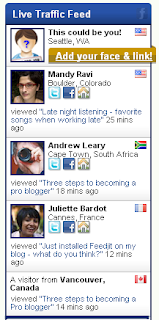
Free Feedjit LiveTraffic Feed For Blogger

0 comments
Ever wanted to see where traffic is coming from on your blog?
Live traffic widget can help you to show visitors’ traffic flow.
So you can see in real time, WHO, FROM WHERE coming on your site and ON WHICH ARTICLE!!
Feedjit is a free tracking tool that tracks visitors to a blog in real time and identifies what pages are visited. FFeedjit gives you up to the minute information about where they are from, the type of browser used, the landing page your visitors arrive at and where they exit from. It also displays the search keyword or keywords the visitor used to access your blog and will help you understand more about the content your visitors are interested in.Feedjit is one of the most popular website which provides the LiveTraffic Feed widget.You don’t need to send any email request or no need to even register yourself to get the widget.It is easy to place a Feedjit Live Traffic Feed widget into the sidebar or footer of your Blogger Blogspot blog. It only takes a few minutes to customize the look of the widget to suit your blog and paste the Feedjit javascript code into a gadget in your Blogger sidebar or footer.

Feedjit not only provides “Live Traffic Feed” widget,There is a choice of 4 different widgets: Live Traffic Feed, Live Traffic Map, Recommended Reading, and Page Popularity. Each of these widgets has different functions:


How To Install Free Live Traffic Feed From FeedJit On Your Blogger


  • Visit Feedjit


  • Select Live Traffic Feed.


  • Click on the Customize It link under Live Traffic Feed. This will allow you to enter colors to match the theme of your blog. If you are in doubt I have found that the easiest method to get the custom colors of a site is to go to the Layout > Page Elements screen in Blogger and click on Add a Gadget and then Adsense. From the configuration screen that pops up you can get the colors of the background, border, title (heading in Feedjit), URL, text. If you use these same colors in your Feedjit widget it will blend in with the rest of your site. You can preview your widget to make sure it looks as you would like it before adding it to your blog.


  • To automatically add the widget to Blogger select the Click to Add to Blogger Link and follow the instructions. Or to manually add it which I myself prefer right click the code in the box under the heading Live Traffic Feed and select copy.


  • Navigate to Layout > Page Elements in your blog if that page is not already open


  • Select Add a Gadget in the Sidebar and then HTML/Javascript


  • Paste the code by placing the mouse in the box and right clicking and selecting paste


  • Save the widget and then using the drag and drop feature of Blogger move it to your desired location. Note HTML/Javascript widgets are best placed after your other widgets for faster loading.


  • if you problem this Instructions To Follow:

    STEP #1 Log in to Blogger, go to Layout

    page-elements

    Add a Gadget of HTML/JavaScript type. 


    image
    Then add this code in to it:.


    Add Animated Flash Clock To Your Blogger - Blogspot Blog

    0 comments

    Two most common widgets bloggers and webmasters put on their websites/blogs are a Clock and a Calendar. When searched on Internet for these free widgets, most probably the top two results in the list would be clocklink.com and worldtimeserver.com/index.aspx.this tutorial will show you how to Add animated flash clock gadget your blog. A clock gives a beautiful look to a website. A clock is a must for a personal homepage, forum, blog etc.Isn’t it exciting when you get a highly quality flash Clock absolutely Free? you can add this flash animated clock your blog easily. it's really faster and cool. all you have to do is follow the instructions given below.. let's go to work.and Congrats you!! I hope you like the clocks.


    1.Login to your blogger Dashboard and go to Desing --> Page Elements.


    2.Click on 'Add a Gadget' on the sidebar.


    3.Select 'HTML/Javascript' and add the one of code given below


    1. Clicking Digital Clock 
    <object><param name="movie" value="http://flash-clocks.com/free-flash-clocks-for-websites/free-flash-clock-33.swf"><embed src="http://flash-clocks.com/free-flash-clocks-for-websites/free-flash-clock-33.swf" width="150" height="150" wmode="transparent"> </embed></object>


    2. Rotating Silver Clock
    <object><param name="movie" value="http://flash-clocks.com/free-flash-clocks-for-websites/free-flash-clock-11.swf"><embed src="http://flash-clocks.com/free-flash-clocks-for-websites/free-flash-clock-11.swf" width="150" height="150" wmode="transparent"> </embed></object>


    3. Black Outline Clock
    <object><param name="movie" value="http://flash-clocks.com/free-flash-clocks-for-websites/free-flash-clock-24.swf"><embed src="http://flash-clocks.com/free-flash-clocks-for-websites/free-flash-clock-24.swf" width="150" height="150" wmode="transparent"> </embed></object>


    4. Simple Clock
    <object><param name="movie" value="http://flash-clocks.com/free-flash-clocks-for-websites/free-flash-clock-23.swf">
    <embed src="http://flash-clocks.com/free-flash-clocks-for-websites/free-flash-clock-23.swf" width="150" height="150" wmode="transparent"> </embed></object>


    5. White Clock
    <embed src=http://flash-clocks.com/free-flash-clocks-blog-topics/free-flash-clock-175.swf width=200 height=200 wmode=transparent type=application/x-shockwave-flash></embed>


    6. Black Clock
    <embed src=http://flash-clocks.com/free-flash-clocks-blog-topics/free-flash-clock-179.swf width=200 height=200 wmode=transparent type=application/x-shockwave-flash></embed>


    7. Clicking Out Digital Clock
    <embed src=http://flash-clocks.com/free-flash-clocks-blog-topics/free-flash-clock-152.swf width=200 height=200 wmode=transparent type=application/x-shockwave-flash></embed>


    8. 3D Clock
    <embed src=http://flash-clocks.com/free-flash-clocks-blog-topics/free-flash-clock-169.swf width=200 height=200 wmode=transparent type=application/x-shockwave-flash></embed>


    9. House Clock
    <embed src=http://flash-clocks.com/free-flash-clocks-blog-topics/free-flash-clock-150.swf width=200 height=200 wmode=transparent type=application/x-shockwave-flash></embed>


    10. Black Cool Clock
    <embed src=http://flash-clocks.com/free-flash-clocks-blog-topics/free-flash-clock-165.swf width=200 height=200 wmode=transparent type=application/x-shockwave-flash></embed>

    Blog Statistics Widget for Blogger / Blogspot

    0 comments

    By blog statistics, i meant the number of blog posts and number of reader comments on your blog.The blog statistics widget displays the total number of posts and the total number of comments made on your blog as a beautiful sidebar widget.

    This widget works using javascript ( the json feeds) which finds the number of comments and posts from your blogs feed..

    To get a blog statistics widget you can use this widget installer.When you use the widget installer make sure that you dont add the http:// part to the url because it is automatically added by the widget installer..Also don't add a slash at the end of the url
    Add Blog Statistics Widget

    Add Flash MP3 player in in Blogger, WordPress blog or your HTML website

    0 comments
    Most of the embedded music players that we see in web are are based on JavaScript and Flash (SWF). We need to encode the required music and video into MP3 and FLV formats to play them online. Also it requires the latest version of Adobe Flash player for online streaming. So if you are running a personal blog or something related with music or video, it would be much better if you can add music stream to your website. Here we have two methods for creating and MP3 music player for your WordPress- Blogger or blog . These players could also be used with Myspace, Orkut and other social networking profiles as scraps or messages .

    The first MP3 music player code is pretty easy to implement when compared with the second one. It allows a lot customizations.

    “This is how this player looks in your website”

    Free Flash MP3 streaming audio player code:


    <object classid="clsid:d27cdb6e-ae6d-11cf-96b8-444553540000" width="400" height="52" codebase="http://download.macromedia.com/pub/shockwave/cabs/flash/swflash.cab#version=6,0,40,0"><param name="flashvars" value="audio_duration=DURATION&amp;external_url=http://sound11.mp3pk.com/indian/aadekhenzara/aadekhenzara01(www.songs.pk).mp3" /><param name="src" value="http://cdn.techknowl.com/wp-content/uploads/2010/03/audio_player_standard_gray.swf" /><param name="wmode" value="transparent" /><embed type="application/x-shockwave-flash" width="400" height="52" src="http://cdn.techknowl.com/wp-content/uploads/2010/03/audio_player_standard_gray.swf" wmode="transparent" flashvars="audio_duration=DURATION&amp;external_url=http://sound11.mp3pk.com/indian/aadekhenzara/aadekhenzara01(www.songs.pk).mp3"></embed></object>

    Create a new page or post in your Blogger or WordPress blog  including the above code and publish. Flash based player will start streaming the external music link added in the code. Remember to change the audio file with one of your choice.
    Edit the above code to change the size, width and other parameters of the player.
    The second type of Flash MP3 music player is derived from 1pixelout’s WordPress audio player plugin. We can directly use 1pixelout’s standalone mp3 player with websites having support for PHP script.
    Here we will explain how you can use that plugin in Blogger and other static website/blogs/social sites .
    Copy the the following code and place just before </head> in your Blog’s template HTML

    <script language="JavaScript" src="http://cdn.techknowl.com/wp-content/uploads/2010/03/audio-player.js"></script>

    Now, for enabling the flash mp3 player in a blog post, put the following in to your post.
    <object type="application/x-shockwave-flash" data="http://cdn.techknowl.com/wp-content/uploads/2010/03/player.swf" id="audioplayer1" height="24" width="290"><param name="movie" value="http://www.techknowl.com/wp-content/uploads/2010/03/player.swf"><param name="FlashVars" value="playerID=1&amp;soundFile=http://sound11.mp3pk.com/indian/aadekhenzara/aadekhenzara01(www.songs.pk).mp3"><param name="quality" value="high"><param name="menu" value="false"><param name="wmode" value="transparent"></object>
    If you plan on posting many MP3 clips in your blog (Blogger) , put the code into your post template by moving on to Settings>Formatting. Remember to edit the MP3 URL (in bold letters ) with your music link .
    Hope you will enjoy these simpler embedded web music players. Check this post if you want to create playlists and add multiple music files to your web player.

    Music player with playlist for Blogger ,WordPress or any website

    0 comments
    148 Music%2Bplayer Music player with playlist for Blogger ,Wordpress or any websiteFew months back we here provided a code for embedding Flash mp3 player in static – dynamic websites and blog platforms like WordPress ,Blogger etc .This player stopped working and many users had already complained about this . Now here is another web based Flash Mp3 player which uses JavaScript from Yahoo media player to turn embedded media links in web pages as streaming files .This music player collects all Mp3 media links from installed website and forms a playlist .

    First you need to upload the above mentioned JavaScript into blog/website template .

    I will explain how this can be done for Blogger .
    Open your Blogger template and move to edit HTML .
    Copy the following code and place anywhere before  </head> tag .
    <script type="text/javascript" src="http://mediaplayer.yahoo.com/js"></script>
    Now create a new blog post with direct HTML link to a music URL .
    <a href=” music URL” > First song</a>
    Save and refresh page .
    150 Mp3%2Bmusic%2Bplayer Music player with playlist for Blogger ,Wordpress or any website
    Blog post with music links will be now shown with a play icon just near to them .
    152 Flash%2Bmp3%2Bplayer%2Bfor%2Bwebsite%2B%2CBlogger Music player with playlist for Blogger ,Wordpress or any website
    On click , the above flash player opens and you will be able to see and play all MP3 media links in the page .

    119 A Simple Snow Effect Widget for Blogger Blogs!

    0 comments
    Here is a simple snow effect widget which you can add to your Blogger powered blog in just one click! This widget does not use images to generate the snow effect: instead it uses plain white text (full stops and apostrophes) to act as snowflakes which trickle down the page. You can see this widget in effect here on Blogger Buster over the holiday period.

    Click the button below to add this widget to your Blogger powered blog:


    This widget was created using the Snow Effect Without Images script by Kurt Grigg which is distributed by Dynamic Drive.

    This widget has been tested in both IE and Firefox and also in complex Blogger templates which use many other JavaScripts. Unlike other snow effect scripts, this simple non-image based widget works just fine!

    I hope you enjoy using this festive decorative widget in your Blogger blogs! Please let me know your opinions or if you experience any trouble installing this widget by leaving your comments below.

    Followers

    Blogumulus by Roy Tanck and Amanda Fazani
    Free Blogger Tips, Hacks, Widgets, Templates and more