Showing posts with label Tutorials. Show all posts

Wednesday, December 15, 2010

Add Your Blog Sitemap to Google Webmaster

0 comments
This video tutorial describes how you can add your blogspot.com blog to Google Webmaster Tools using an XML sitemap.


Add Your Blogspot Blog Sitemap to Google Webmaster Tools

Step 1. Open the Google Webmaster Tools website at google.com/webmasters and click "Add a Site" button to submit your Blogger blogger.

You can either type the web address (URL) of your blogspot.com blog or even a self-hosted blog where you are using the Blogger platform with your personal domain.

Step 2. Google will ask you to verify that you are the owner of this blog. Just copy-paste the meta code to the clipboard and then paste* this information into the template of your Blogspot blog.

*You should switch to the "HTML" version of your blog template and paste the code just below the tag.

Step 3. Go back to Google Webmaster Tools and select "Sitemaps" from the right sidebar. Now click the "Submit a Sitemap" button.

blogger sitemap

Step 4. Type atom.xml?redirect=false and submit. Once the clock status icon changes to a green tick, your Blogger sitemap has been successfully submitted to Google for indexing.

* If you are using FeedBurner for your Blogger RSS Feeds, the redirect=false parameter will force Google to download your Blogger feed and not the FeedBurner feed.

Make Mozilla Firefox Load Pages Faster

0 comments
Tweak Network 1.3 is the mozilla addon which will speed up the loading of web pages and increase the maximum number of simultaneous downloads from a site. If you are using Firefox browser? There are many ways to make Firefox work faster; perhaps you have ever read many tips on the internet to make Firefox faster.Now i will share a tip to make your Firefox faster which is installing Tweak Network Add-on.


It is very easy to get Tweak Network Add-on; you just need to download it here

After going there click on Add To Firefox > Then it will Ask for Install > Click I
nstall Button > Then the Add On will get installed > It will Ask for restart of Firefox Restart it .

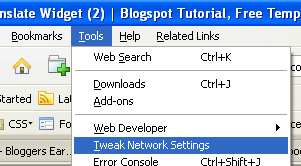
After you install Tweak Network Add-on, please follow the guides below.Please run your Firefox. Click Tools menu, when the options appear, click Tweak Network Settings.


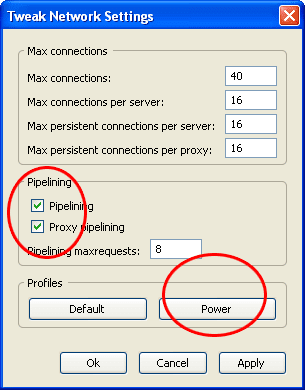
Then an alert will appear Click OK. Now window will open.
Click Power button, then click Apply button ,Then Click OK Done


I hope this will speed up your mozilla if it works slow. Best of luck for this addon.Happy Browsing.

How Check Broken Links In Blog And Website

0 comments
How to Check Broken Links In your blog or website as if you would have many posts in your blog and its not possible to constantly check for any broken links in your website manually,and its importanat to find the broken links as the post may not be useful without that link.So you just need a program or software to check all your internal and external links in your blog or website for broken links.Dont you,If yes then for what you are waiting.

Just visit this site http://home.snafu.de/tilman/xenulink.html#Download to know more abut it

Read all about it if you want to know about whole process.This is the Download Link on above site to download the software.

Just download it unzip it to get set up and install it in your computer,i will just take seconds.

Then start the software it will ask for url provide it and click ok.The pocess will start,the time it takes depend upon the links you are having in your blog.Below is the snapshot my blog report,you can check it how good the software work.Its really helpful.

Please click the image to view it large


I hope you will love this software its really helpful to you as nobody checks for broken links as posts get old,but we should remove broken links as it never make you loose your readers.

Promote Random Blog Posts Via Gmail

0 comments
One way to promote your blog is adding your signature links in all the mails you send.There are many ways to promote your blog and this is the one out of those as will help promote it though,as you think i daily receive about 10 mails to solve my readers queries and its going on to increase to.You can take great advantage of it a you can use signature as an random posts from your blog as will attract your readers more to your blog.

Tip: It is always effective to send out different links with your email to your Friends as they wont be boring seeing the same link all the time.

Lets see how we can add a link to a random post from your blog or website to your email signature

*Log in to your GMail account.
*Go to the Gmail Lab Page.
*Find the Random Signature and Signature tweaks.
*Enable both labs.
*Click Save Changes and Gmail will reload.
*Go to Settings
*Go to General
*Under signature select the signature box and type you name and other information you would like to display in your email.
*Then check the check box Append a random signature from feed and add the feed URL to your blog or website.
* click "Save Changes"

This is add random links to your post with the title from your RSS feed. Simple but quite effective method to add a random link to your signature from your blog or web.
If you liked his post please leave your comments as all will be appreciated.

Remove Duplicate Content And Urls From Blogger

0 comments
Hi Friends,i hope you all will be fine.As since it has been really a long time for me to have any useful post for you.As before i was busy in exams and after it i didn't got time but today i have an really useful post for you.As blogger is not very search engine optimized and we have to keep in mind some things to make it seo or have to implement some hacks to make it seo to an extent we can.

As previously i had an post on problem with blogspot blogs in seo,which also was very informative post for every blogger.You have to read it for sure before continuing this post.

Some other tips you can read on to increase your visitors are how to increase visitors from search engines and promote you random posts via emails.

Now let continue on some useful tips to make you blogger really seo by removing all duplicate content from your blog.Duplicate content can be urls,meta tags,titles and descriptions.

First Issue:-Adding Of Meta Tags:As we all bloggers add meta tags to there blogs.Meta tags are used to tell search engines about the important keywords of your blog and inform it to rank high,there blog for these keywords.As in the way we all add meta tags to blogger,we don't know that they are adding it in wrong way and effecting rank of all blogger pages,becuase the way we are adding meta tags,the seach engines are considering it for all your posts.As i will tell on how to add these meta tags correctly.

If you you don't know how to ad meta tags you can read for sure.

Solution:-Whenever you are adding meta tags to blogger just embed that tags between these two lines,i am writing below.As embeding between them will make it add only for blog home page url.


<b:if cond='data:blog.url == data:blog.homepageUrl'>
<-----------------Meta Content Here------------------->
</b:if>


Just add meta tags in between them,and to get meta tags you can read on this post.As now search engines will consider them for only your blog home page,not all blogger pages,which will remove duplication of same keywords for all your blogger posts.


Second Issue:-Different Urls With Same Content In your blog:As there is one more problem in blogger as search engines indexes comment links of blogger posts,now if you have comments on posts and search engine indexes blogger posts url and also indexes its comments link and find the same content in both,which make the duplicate content for search engines and your seo for that post will be effected,its an serious cause and should be solved.Just view the picture below to make it clear.


Image source From Bloggerstop.net

As you can see in image the post page is same but it is being indexed for two differnt urls,which creates duplicate content and affects seo.

Solution:-Go To (Layout -> Edit HTML), click on "Expand Widget Templates",
Then Press (CTRL+F) and find below codes:


<a expr:href='data:comment.url' title='comment permalink'>
<data:comment.timestamp/>
</a>


And Replace above codes with any one codes you like:-


First One:-

<b:if cond='data:post.commentPagingRequired'>
<a expr:href='data:comment.url' title='comment permalink'> <data.comment.timestamp/> </a>
<b:else/>
<a expr:href='data:blog.url + &quot;#&quot; + data:comment.anchorName' title='comment permalink'> <data:comment.timestamp/> </a>
</b:if>

These codes will change the form of link and stop them from being indexed.

Second One:-

<a expr:href='data:comment.url' title='comment permalink' rel='nofollow'>
<data:comment.timestamp/>
</a>

It will make the link simply nofollow and inform engines not to follow them.


Now your comments link will not be get indexed by search engines.In a month time, i am sure google will start visiting your blog more and make it seo.Best Of Luck From Me !!!

Followers

Blogumulus by Roy Tanck and Amanda Fazani
Free Blogger Tips, Hacks, Widgets, Templates and more